Your AI agents are calling tools. Whether they use MCP or direct function calling, you need visibility, control, and guardrails. Here’s how both approaches work — and how to govern them without slowing down your teams.
The Tool-Calling Revolution
Something fundamental has changed in how we build AI applications. Large language models are no longer just answering questions — they’re doing things. They’re querying databases, filing support tickets, sending messages, searching the web, and writing code.
This capability goes by many names: function calling, tool use, agentic actions. But regardless of what you call it, the pattern is the same: an AI model decides it needs to interact with the outside world, and your infrastructure makes it happen.
The question for engineering and platform teams is no longer whether to let AI models call tools. It’s how — and more importantly, how to keep it safe, observable, and under control as you scale.
Today, there are two primary approaches to connecting AI models with tools:
- Direct Function Calling — tools defined in the LLM API request itself
- Model Context Protocol (MCP) — a standardized protocol for tool discovery and execution
Both are valid. Both are widely used. And both need governance. Let’s break them down.
Why Brutor AI Exists: It Started with MCP
If you’ve ever looked at the landscape of AI integrations — agents connecting to LLMs, LLMs connecting to tools, tools connecting to APIs, APIs connecting to databases — and thought “this looks like a plate of spaghetti with the sauce exploding everywhere,” you’re not alone. That’s exactly how I saw it when Anthropic released the Model Context Protocol in late 2024.
MCP changed the picture. For the first time, there was a standardized way for AI models to discover and use tools — not through one-off integrations, but through an open protocol that any application could adopt. It was a genuine step toward taming the chaos.
But as I dug deeper into MCP and what it would mean for enterprises, I came to realize very early on that comprehensive governance wasn’t just nice to have — it was essential. Organizations would rush to connect their AI agents to everything, and nobody would be thinking about who can access what, how much it costs, or what happens when things go wrong.
That realisation was the cornerstone of the Brutor AI Platform. I decided to build the governance layer that the MCP ecosystem — and the broader AI tool-calling landscape — was going to need. The early work of companies like Obot, who pioneered the first MCP Dev Summit events and helped build the community around the protocol, confirmed that MCP was gaining real traction — and that the governance gap was widening fast.
That conviction hasn’t changed. What has changed is that the need has grown far beyond MCP alone.
Direct Function Calling: The Native Approach
Direct function calling is built into the LLM APIs you already use. When you send a request to OpenAI, Anthropic, Google, or any major provider, you can include a tools array that describes the functions your model can call.
A typical tool-calling request — the tools array tells the model what functions are available:
{
  "model": "gpt-5.2",
  "messages": [{"role": "user", "content": "What's the weather in London?"}],
  "tools": [{
    "type": "function",
    "function": {
      "name": "get_weather",
      "description": "Get current weather for a city",
      "parameters": {
        "type": "object",
        "properties": {
          "city": {"type": "string"}
        }
      }
    }
  }]
}
The model looks at the user’s message, decides whether to use a tool, and returns a structured tool_calls response that your application code then executes. Your code calls the actual function, sends the result back to the model, and the model formulates a final answer.
When Direct Function Calling Shines
- Tight integration: Your tools are defined in code, version-controlled, and deployed alongside your application
- Low latency: No protocol overhead — the tool definition is part of the API call
- Simple orchestration: Frameworks like LangChain, LangGraph, CrewAI, and the Anthropic Agent SDK handle the tool loop natively
- Provider flexibility: Every major LLM provider supports function calling with slight API variations
The Governance Challenge
Here’s where it gets complicated. When an AI agent has access to 20 tools — some reading data, some writing it, some calling external APIs — who decides which tools it can use? What happens when a junior developer’s agent accidentally calls a delete_production_database function? How do you enforce that certain tools require human approval before execution?
With direct function calling, governance lives entirely in your application code. There’s no standard place to define policies, no central audit log, and no way for a platform team to enforce guardrails across all AI applications.
MCP: The Standardized Approach
The Model Context Protocol (MCP), developed by Anthropic and now widely adopted, takes a different approach. Instead of defining tools inline with each LLM request, MCP creates a server-client architecture for tool discovery and execution.
An MCP server exposes capabilities — tools, resources, prompts, and templates — through a standardized JSON-RPC interface. An MCP client (your AI application, chat interface, or agent framework) discovers what’s available, presents it to the model, and routes tool calls through the server.
How MCP Works
- Discovery: The client connects to an MCP server and asks “what can you do?”
- Capability listing: The server responds with its tools, resources, and prompts
- Tool execution: When the model wants to call a tool, the request goes through the MCP server
- Authentication: MCP supports OAuth 2.0, so servers can require proper authentication
- Session management: Stateful connections allow servers to maintain context
When MCP Shines
- Ecosystem: A growing library of pre-built MCP servers for GitHub, Slack, HubSpot, databases, file systems, and hundreds more
- Standardization: One protocol, many servers — your AI application connects to any MCP server without custom integration code
- Authentication: OAuth flows are built into the protocol, not bolted on
- Separation of concerns: The tool implementer and the AI application developer don’t need to coordinate
- Dynamic discovery: Tools can change without redeploying your application
The Governance Challenge
MCP introduces its own governance complexity. When your organization runs dozens of MCP servers — some internal, some third-party — how do you control which users can access which servers? How do you rate-limit tool calls to prevent runaway costs? How do you audit every tool invocation across every server?
Without a governance layer, MCP becomes a wild west of tool access.
MCP vs. Direct Function Calling: The Real Comparison
Let’s cut through the hype and compare what matters:
| Dimension | Direct Function Calling | MCP |
|---|---|---|
| Tool definition | In-code, per-request | Centralized, per-server |
| Discovery | Static (compile-time) | Dynamic (runtime) |
| Authentication | Application-level | Protocol-level (OAuth 2.0) |
| Ecosystem | Build your own | Growing open-source library |
| Latency | Lower (inline) | Higher (extra hop) |
| Governance | Application-level only | Can be centralized |
| Audit trail | Roll your own | Standardized request/response |
| Session state | Application-managed | Protocol-managed |
| Adoption | Universal (all LLM APIs) | Growing (Anthropic, OpenAI, Google, IDE tools) |
MCP in 2026: Momentum, Maturity, and a Heated Debate
MCP’s adoption has been extraordinary. The protocol is now governed by the Agentic AI Foundation under the Linux Foundation, with Anthropic, OpenAI, and Block as co-founders. Over 5,800 verified MCP servers are publicly available, SDK downloads run at 97 million monthly, and the first Linux Foundation MCP Dev Summit — held in New York City on April 2–3, 2026, with over 95 sessions and speakers from Anthropic, Microsoft, Datadog, and Hugging Face — confirmed that MCP has become the de facto standard for connecting AI agents to the outside world.
But 2026 has also brought a candid reckoning about MCP’s real-world limitations — and the debate is worth paying attention to, because it shapes how you should think about governance.
The Token Tax Problem
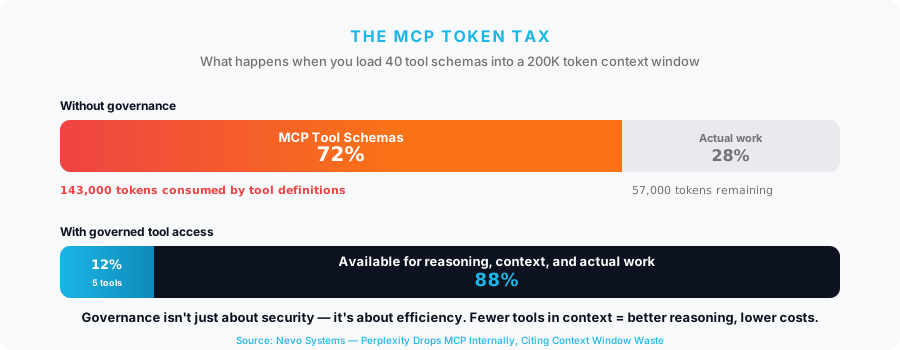
MCP’s biggest growing pain is context window consumption. Every connected tool requires its schema to be loaded into the model’s context window. Connect dozens across multiple MCP servers and the overhead becomes severe. In one widely cited deployment, three MCP servers consumed 72% of the available context window before the model had processed a single user message. Cloudflare found that exposing their full Workers API through MCP would require over a million tokens just for tool definitions. At scale, this isn’t a minor inefficiency — it’s a cost multiplier on every request.
Perplexity Walks Away — Others Push Back
In March 2026, Perplexity’s CTO announced at the Ask 2026 conference that the company is moving away from MCP internally, citing high context window consumption and clunky authentication flows. They launched their own Agent API as an alternative — a single endpoint, one API key, no MCP server management. Y Combinator’s CEO took a similar stance, building a CLI-based alternative and publicly questioning MCP’s overhead. Cloudflare’s Code Mode approach — having agents write code against typed SDKs instead of calling MCP schemas — reduced their token footprint from over a million tokens to roughly a thousand.
Why MCP is Not Going Anywhere
Yet for every team walking away from MCP, thousands more are adopting it. Even the critics acknowledge that MCP solves a real problem: without it, every AI provider has its own tool format — OpenAI’s function calling, Anthropic’s tool use, Google’s function declarations — each requiring separate integration work. MCP’s “build once, connect everywhere” value doesn’t disappear because the protocol has scaling challenges. With 97 million monthly SDK downloads and over 5,800 verified servers, the protocol’s ecosystem is enormous and growing.
The more nuanced view — and the one emerging as the industry consensus — is that MCP is not going away, but naive implementations are. The era of loading every available tool into every context window is ending. What’s replacing it is smarter architecture: progressive tool discovery, lazy loading, semantic search over tool catalogs, and — critically — governance layers that ensure each agent only sees the tools it actually needs.
Why governance solves the token problem too
When you control which tools are available to which teams and agents — through capability-level access control, tool whitelists, and resource group policies — you’re not just enforcing security. You’re solving the token overhead problem at its root. An agent that can only access five approved tools doesn’t waste context on fifty it will never use.
The Real Answer: You’ll Use Both
This isn’t an either/or decision. Modern AI applications typically use both approaches:
- Direct function calling for tightly-coupled, latency-sensitive operations — your core business logic, internal APIs, and real-time data processing
- MCP for ecosystem integrations — connecting to GitHub, Slack, CRM systems, search engines, and other third-party services where a standardized protocol reduces integration effort
This is the reality I had in mind when I built Brutor AI Platform with MCP governance at its core. The platform was designed from the start to handle both MCP and direct function calling — not because hedging is safe, but because real-world AI applications use both approaches and need consistent governance across all of them.
The Governance Gap
Whether your agents use direct function calling, MCP, or both, the same governance questions apply:
- Access Control: Who can use which tools? A data science team should access analytics tools. A support team should access CRM tools. Neither should access deployment tools without approval.
- Rate Limiting: How many tool calls per day? A runaway agent loop can burn through API quotas in minutes. You need frequency limits at the tool, server, and user level.
- Approval Workflows: Which tool calls need human review? Writing a Slack message might be fine. Deleting a GitHub repository should require approval.
- Content Safety: What’s being sent to tools? Guardrails should check tool arguments for PII, credentials, or dangerous patterns before they reach external systems.
- Audit and Observability: What happened, when, and why? Every tool call needs to be logged with full context: who made it, which model triggered it, what arguments were passed, and what the result was.
- Cost Management: What’s all this tool calling costing? Token usage, API costs, and tool invocation costs need to be tracked and capped per team and per application.
These aren’t hypothetical concerns — they’re the daily reality for any organization running AI at scale. Brutor AI Platform was built to answer every one of them.
How Brutor AI Platform Governs Both
Brutor AI Platform is an AI gateway that sits between your applications and AI providers, providing unified governance for both MCP and direct function calling — without changing how your agents work.
For MCP: Full Protocol Support
- Capability-Level Access Control: Configure which tools, resources, and prompts each team can access — down to the individual capability name. A three-state model (enabled → approval required → disabled) gives you fine-grained control without binary all-or-nothing decisions.
- Per-Server and Per-Group Limits: Set daily call limits per MCP server, per resource group, or globally. When usage hits 80%, a warning header is returned so applications can back off gracefully.
- OAuth and Authentication Management: Brutor manages OAuth flows for MCP servers centrally. Configure client credentials once, and the platform handles token exchange, refresh, and revocation — your applications never see raw credentials.
- Approval Workflows: Mark specific MCP tools as requiring approval. When an agent tries to call them, Brutor creates an approval request with full context, and the call is held until approved or timed out.
For Direct Function Calling: LLM-Level Governance
- Tool Use Access Control: Per-model, per-group policies control whether tool calling is enabled, requires approval, or is disabled. You can whitelist specific tool names or blacklist dangerous ones.
- Tool Call Rate Limits: Set max tool calls per request, per hour, and per day to prevent runaway agent loops. These limits are enforced in real-time by the proxy.
- Banned Argument Patterns: Define regex patterns that block tool calls containing sensitive content — like hardcoded credentials, SQL injection patterns, or PII in tool arguments.
For Both: Unified Guardrails and Observability
- Content Guardrails: Every request and response — whether MCP or direct — passes through configurable guardrails. PII detection, prompt injection blocking, jailbreak prevention, and toxic content filtering work across all surfaces.
- Semantic Caching: Responses to identical or semantically similar questions are cached. Tool-calling responses where tools were actually invoked are automatically excluded, while simple questions are cached efficiently.
- Unified Audit Trail: Every proxied request is logged with full context: model used, tokens consumed, cost estimated, cache status, guardrail results, tool calls made, and approval outcomes. One audit log for everything.
Real-World Scenarios
The governance model above isn’t theoretical. Here’s how Brutor AI Platform handles three common enterprise setups — each using a different combination of MCP and direct function calling, each with its own access rules, limits, and safety requirements.
Scenario 1: Customer Support Agent with MCP Tools
Through Brutor, the support team gets access to Zendesk, Salesforce, and Slack — with guardrails that prevent overreach:
- Support team’s resource group has access to Zendesk, Salesforce, and Slack MCP servers
- Zendesk “create ticket” and “update ticket” are enabled
- Zendesk “delete ticket” requires approval
- Salesforce access is read-only (write tools disabled)
- Slack “send message” enabled, “delete channel” disabled
- Daily limit: 500 MCP calls per user
- All tool arguments scanned for PII before reaching external systems
Scenario 2: Code Assistant with Direct Function Calling
Through Brutor, the engineering team uses Claude Code and Cursor via the OpenAI-compatible API — with safety limits that prevent accidents:
- Engineering team uses Claude Code and Cursor through Brutor’s API
- Tool calling enabled with whitelist for code execution and file read/write
- Blacklist prevents rm -rf, DROP TABLE, and deployment tools
- Banned argument patterns block credentials in tool parameters
- Max 50 tool calls per request (prevents infinite loops)
- Temperature capped at 0.3 for code generation models
Scenario 3: Multi-Agent Research Pipeline
Through Brutor, the data science team runs a LangGraph pipeline that combines MCP and direct function calling — governed under one policy:
- Data science team runs LangGraph pipeline combining MCP and direct function calling
- MCP Web Search server: 1,000 calls/day limit
- MCP Database server: read-only, write access requires approval
- Direct tool calling enabled with specific tool whitelist
- All interactions logged for reproducibility
- Monthly budget cap of $5,000 across all models and tools
- Semantic caching enabled to avoid redundant API calls
Three teams. Three different tool-calling approaches. One Brutor deployment. That’s the point — your platform team sets the rules once, and every agent, every protocol, every tool call is governed consistently.
Getting Started
Brutor AI Platform deploys in minutes with Docker Compose and requires zero changes to your existing AI applications. It’s compatible with any OpenAI-compatible client (Claude Code, Cursor, Goose, Continue, Aider, LangChain, LangGraph, Open WebUI), any MCP client (Claude Desktop, VS Code, JetBrains, custom clients), and any LLM provider (OpenAI, Anthropic, Google, Mistral, Groq, Cohere, DeepSeek, and 30+ more).
The platform includes 300+ pre-configured models, a built-in user portal, admin console, semantic caching, and Policy-as-Code governance — all governed through a single control plane.
Whether your agents call tools through MCP or through direct function calling, Brutor gives you the visibility, control, and confidence to let AI do its work — safely.







Sources: Anthropic — Model Context Protocol Specification · Linux Foundation — Agentic AI Foundation, MCP Dev Summit NYC 2026 · Nevo Systems — Perplexity MCP Context Window Analysis · Cloudflare — Code Execution with MCP · The New Stack — How to Reduce MCP Token Bloat · CIO Magazine — Why MCP Is on Every Executive Agenda · Gartner — Top Strategic Technology Trends 2026